开启左侧

Dify + MCP 实现Chat with DB

[复制链接]
作者:CSDN博客
文章目录

    BackgroundMCP Server Demo
      环境准备
        UV
      创建项目编写MCP Server
    Dify集成MCP Server
      工具预览


Background

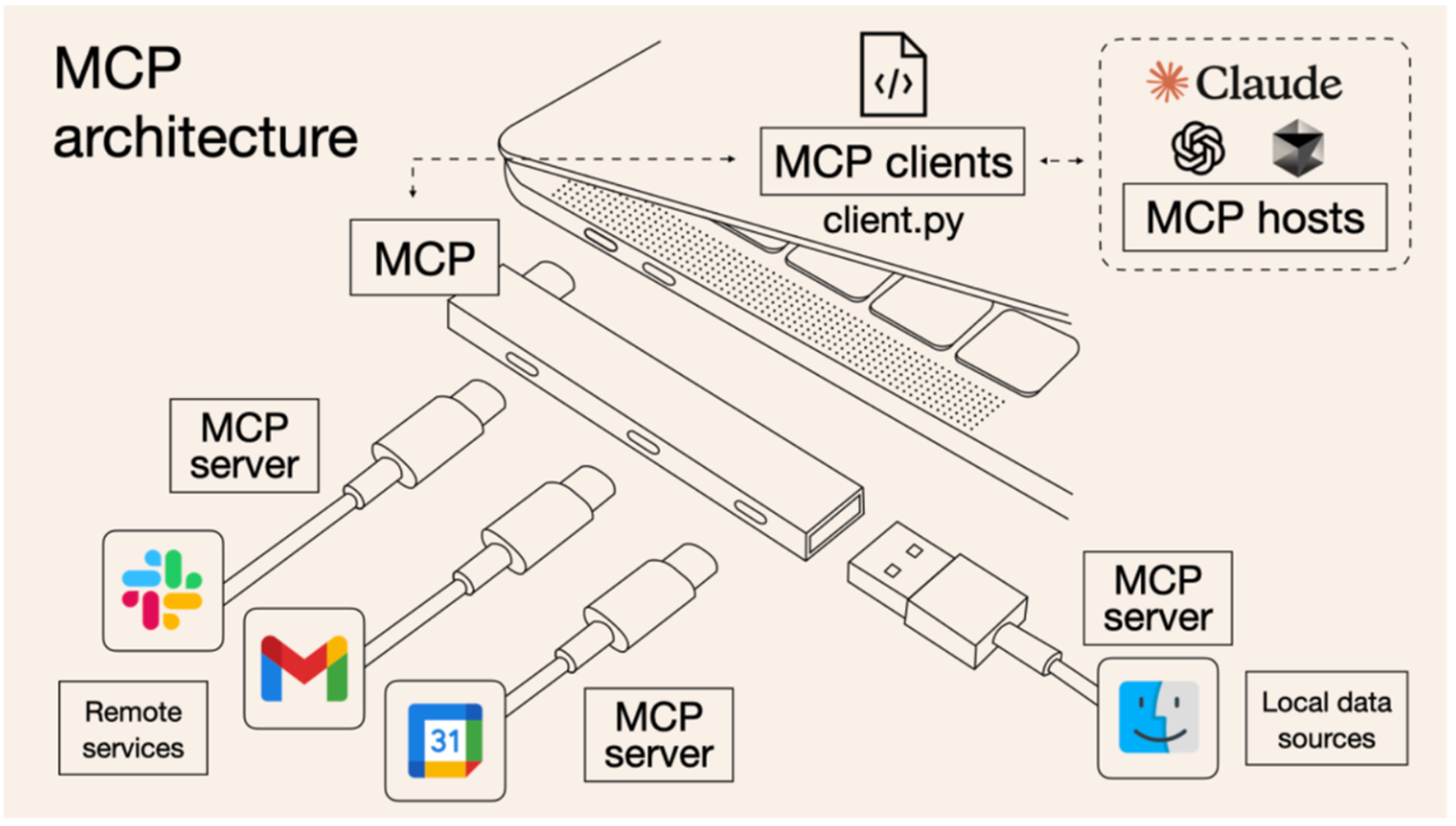
当前LLM 会因为数据孤岛限制无法充分发挥潜力. MCP (Model Context Protocal, 模型上下文协议), 2024年11月底, 由Anthropic 推出的一种开放标准, 旨在统一大预言模型于外部数据源和工具之间的通讯协议. MCP 使得LLM 能够安全地访问和操作本地及远程数据, 为AI 应用提供了连接万物的接口

Dify + MCP 实现Chat with DB-1.jpg

本次我们会搭建一个demo 并使得 Dify 可以和 MCP Server 进行交互, 实现chat with db 的效果
MCP Server Demo

环境准备

UV

MCP SDK 需要使用uv 作为包管理工具, 通过下面的两个语句安装
  1. # On macOS and Linux.curl -LsSf https://astral.sh/uv/install.sh |sh
复制代码
  1. # On Windows.
  2. powershell -ExecutionPolicy ByPass -c "irm https://astral.sh/uv/install.ps1 | iex"
复制代码
创建项目

通过uv 创建一个python project
  1. uv init mcp-server-demo
  2. cd mcp-server-demo
复制代码
Dify + MCP 实现Chat with DB-2.jpg


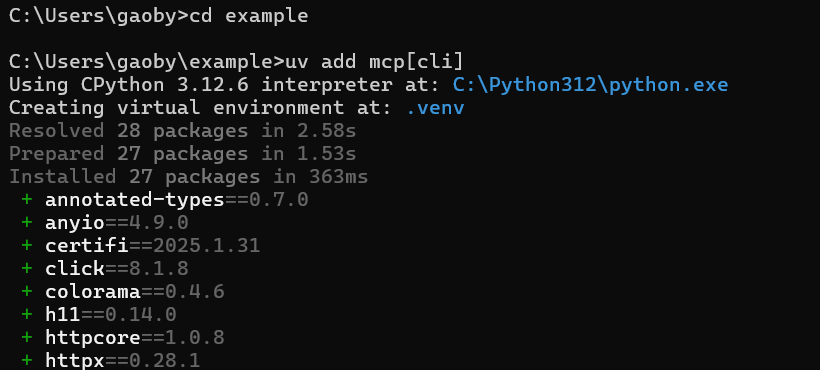
添加MCP 依赖
  1. uv add "mcp[cli]"
复制代码
Dify + MCP 实现Chat with DB-3.jpg


编写MCP Server

通过FastMCP 创建一个 MCP Server
  1. import pandas as pd
  2. from sqlalchemy import create_engine, text
  3. from mcp.server.fastmcp import FastMCP
  4. mcp = FastMCP("starrocks")
复制代码
编写一个函数用于在starrocks 中执行sql 查询, 通过@mcp.tool() 装饰器将这个函数作为工具暴露给LLM, 并在函数中通过文档字符串声明工具的input 和output
  1. @mcp.tool()
  2. def query_user_data(sql_query: str):
  3.     '''Add sql query to get data from starrocks database.'''
  4.     # 连接到StarRocks数据库
  5.     engine = create_engine('starrocks://root@127.0.0.1:9030/quickstart')
  6.    
  7.     # 执行查询并获取结果
  8.     with engine.connect() as connection:
  9.         result = connection.execute(text(sql_query)).fetchall()
  10.     # 将查询结果转换为 Pandas DataFrame
  11.     ret_df = pd.DataFrame(result)
  12.    
  13.     return ret_df
复制代码
同理开发其余的功能
  1. @mcp.tool()defget_table_names():'''get table name list from starrocks.'''# 连接到StarRocks数据库
  2.     engine = create_engine('starrocks://root@127.0.0.1:9030/quickstart')# 执行查询并获取表名with engine.connect()as connection:
  3.         sql_query ="SHOW TABLES"
  4.         result = connection.execute(text(sql_query)).fetchall()# 将查询结果转换为 Pandas DataFrame
  5.     table_names =[row[0]for row in result]return table_names
  6. @mcp.tool()defget_table_schema(table_name:str):'''add table name to get table schema from starrocks.'''# 连接到StarRocks数据库
  7.     engine = create_engine('starrocks://root@127.0.0.1:9030/quickstart')# 执行查询并获取表名with engine.connect()as connection:
  8.         sql_query =f"DESCRIBE {table_name}"
  9.         result = connection.execute(text(sql_query)).fetchall()# 将查询结果转换为 Pandas DataFrame
  10.     table_schema =[row[0]for row in result]return table_schema
复制代码
定义一个主函数用于启动server
  1. if __name__ =="__main__":
  2.     mcp.run(transport='sse')
复制代码
Dify + MCP 实现Chat with DB-4.jpg


Dify集成MCP Server

工具

从Dify marketplace 中安装下面的工具

Dify + MCP 实现Chat with DB-5.jpg

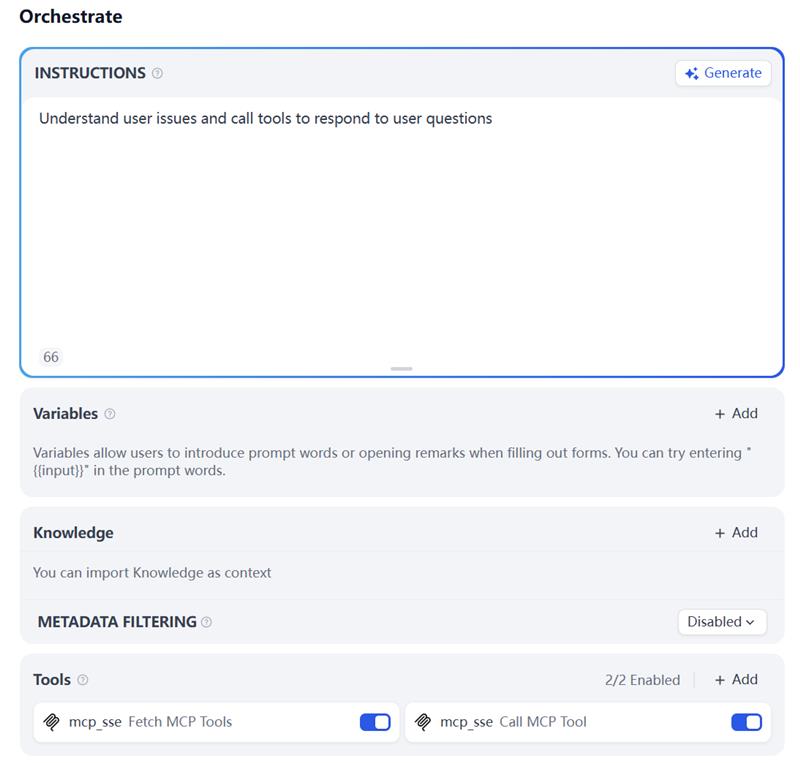
创建一个智能体并配置工具

Dify + MCP 实现Chat with DB-6.jpg

在tool 中添加下面的参数
  1. {"server_name":{"url":"http://<your_mcp_service_ip>:8000/sse","headers":{},"timeout":60,"sse_read_timeout":300}}
复制代码
预览

Dify + MCP 实现Chat with DB-7.jpg


原文地址:https://blog.csdn.net/weixin_42980968/article/details/147460252
回复

使用道具 举报

您需要登录后才可以回帖 登录 | 立即注册

本版积分规则

发布主题
阅读排行更多+

Powered by Discuz! X3.4© 2001-2013 Discuz Team.( 京ICP备17022993号-3 )