作者:CSDN博客
LangGraph快速入门总结
1. LangGraph框架概述
1.1 核心定位
LangGraph是LangChain生态中的新一代Agent开发框架,采用图结构工作流编排,突破了传统链式结构的局限性。
技术特点:
基于图结构的Agent编排工具支持有状态循环图(可控状态机)三层API架构:底层图结构API → Agent API → 预构建Agent
1.2 与LangChain的关系
本质关系:LangGraph是LangChain的高级编排工具技术实现:底层仍依赖LangChain的Chain机制核心优势:图结构编排 vs 线性链式结构
2. LangGraph技术架构
2.1 三层API架构
- ┌─────────────────┐
- │ 预构建Agent │ 最高层封装
- ├─────────────────┤
- │ Agent API │ 中层封装
- ├─────────────────┤
- │ 底层图结构API │ 基础构建块
- └─────────────────┘
开发效率:3行代码创建完整Agent灵活性:支持从底层到高层的渐进式开发可扩展性:丰富的预构建组件
2.2 图结构核心概念
节点(Nodes):执行具体任务的函数边(Edges):控制节点间数据流向状态(State):节点间消息传递的载体
2.3.1 调用llm示例:
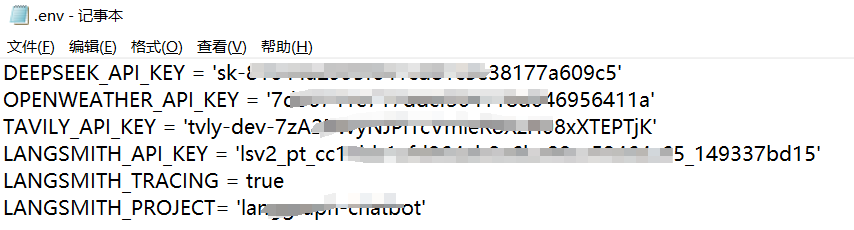
首先同级目录下创建.env文件,内容如下:
- import os
- from dotenv import load_dotenv
- load_dotenv(override=True)
- DeepSeek_API_KEY = os.getenv("DEEPSEEK_API_KEY")from langchain.chat_models import init_chat_model
- model = init_chat_model(model="deepseek-chat", model_provider="deepseek")
- question ="你好,请你介绍一下你自己。"
- result = model.invoke(question)print(result.content)
- import requests,json
- import os
- from dotenv import load_dotenv
- load_dotenv(override=True)
- from langchain_core.tools import tool
- from pydantic import BaseModel, Field
- classWeatherQuery(BaseModel):
- loc:str= Field(description="The location name of the city")@tool(args_schema = WeatherQuery)defget_weather(loc):"""
- 查询即时天气函数
- :param loc: 必要参数,字符串类型,用于表示查询天气的具体城市名称,\
- 注意,中国的城市需要用对应城市的英文名称代替,例如如果需要查询北京市天气,则loc参数需要输入'Beijing';
- :return:OpenWeather API查询即时天气的结果,具体URL请求地址为:https://api.openweathermap.org/data/2.5/weather\
- 返回结果对象类型为解析之后的JSON格式对象,并用字符串形式进行表示,其中包含了全部重要的天气信息
- """# Step 1.构建请求
- url ="https://api.openweathermap.org/data/2.5/weather"# Step 2.设置查询参数
- params ={"q": loc,"appid": os.getenv("OPENWEATHER_API_KEY"),# 输入API key"units":"metric",# 使用摄氏度而不是华氏度"lang":"zh_cn"# 输出语言为简体中文}# Step 3.发送GET请求
- response = requests.get(url, params=params)# Step 4.解析响应
- data = response.json()return json.dumps(data)
- # 封装外部函数列表
- tools =[get_weather]from langchain.chat_models import init_chat_model
- model = init_chat_model(model="deepseek-chat", model_provider="deepseek")from langgraph.prebuilt import create_react_agent
- agent = create_react_agent(model=model, tools=tools)
- response = agent.invoke({"messages":[{"role":"user","content":"请问北京今天天气如何?"}]})print(response["messages"][-1].content)
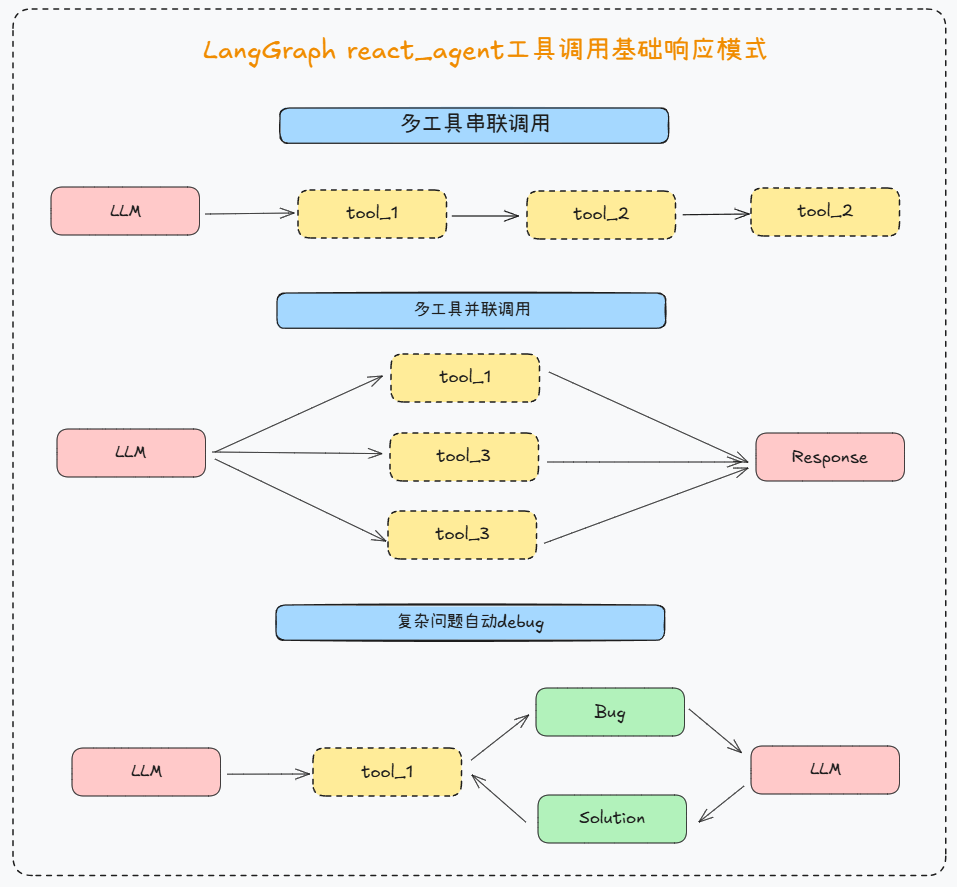
2.3.3 LangGraph React Agent外部工具响应形式:
a.并发调用- response = agent.invoke({"messages":[{"role":"user","content":"请问北上广深今天哪里更热?"}]})
- response
- from tenacity import retry, stop_after_attempt, wait_fixed
- #最多重试 3 次(stop_after_attempt(3))每次重试间隔 2 秒(wait_fixed(2)) ,config={"timeout": 30}最大响应等待时间@retry(stop=stop_after_attempt(3), wait=wait_fixed(2))defsafe_invoke(agent, inputs,config={"timeout":30}):return agent.invoke(inputs,config)
- response = safe_invoke(agent,{"messages":[{"role":"user","content":"请问上海和兰州今天哪里更热?"}]})
- from langchain_core.tools import tool
- from pydantic import BaseModel, Field
- classWrite_Query(BaseModel):
- content:str= Field(description="需要写入文档的具体内容")@tool(args_schema = Write_Query)defwrite_file(content:str)->str:"""
- 将指定内容写入本地文件。
- :param content: 必要参数,字符串类型,用于表示需要写入文档的具体内容。
- :return:是否成功写入
- """return"已成功写入本地文件。"# 封装外部函数列表
- tools =[get_weather, write_file]
- agent = create_react_agent(model=model, tools=tools)
- response = agent.invoke({"messages":[{"role":"user","content":"你好,请帮我查询北京和杭州的天气,并将其写入本地文件中。"}]})print(response["messages"][-1].content)
LangGraph智能体,除了能够灵活接如自定义工具,还能够接入LangChain丰富的内置工具,快速完成智能体开发。 在 LangChain 框架中,工具(Tools)是实现语言模型与外部世界交互的关键机制。LangChain 提供了大量内置与可扩展的工具接口,使得智能体(Agent)能够执行函数调用、访问 API、查询搜索引擎、调用数据库等任务,从而超越纯语言生成的能力,真正实现“能行动的智能体”。LangChain 官方文档将这些工具按照其用途进行了模块化划分,涵盖了以下主要类别:
[table][tr][td]功能类别[/td][td]工具名称[/td][td]简要说明[/td][/tr][tr][td] |








 广告
广告