作者:CSDN博客
LangChain4j
LangChain4j 是 LangChain 的 Java 版本,旨在为 Java 开发者提供构建大型语言模型(LLM)应用的框架。它简化了 LLM 与 Java 应用程序的集成,支持多种主流模型(如 OpenAI、阿里百炼、百度文心等),并提供丰富的工具链,如聊天记忆管理、提示模板、检索增强生成(RAG)、工具调用(Function Calling)和智能代理(Agent)等
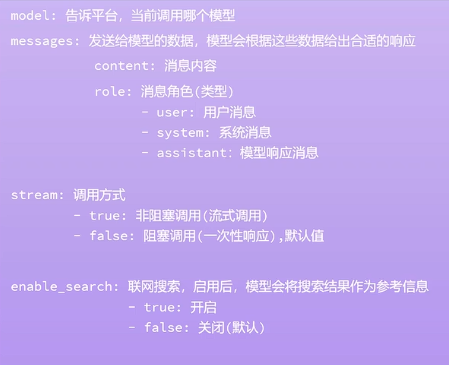
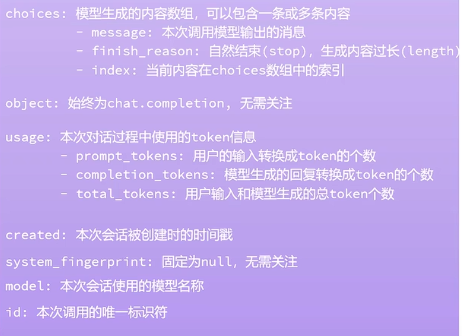
OpenAI API 请求与响应参数详解
请求信息
响应信息
LangChain4j快速入门
获取ApiKey
阿里云百炼获取ApiKey:https://bailian.console.aliyun.com/?utm_content=se_1021829511&tab=model#/api-key
创建ApiKey
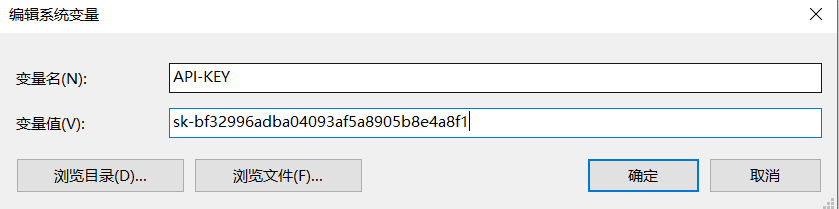
给ApiKey设置环境变量
引入依赖
langchain4j-open-ai依赖- <dependency><groupId>dev.langchain4j</groupId><artifactId>langchain4j-open-ai-spring-boot-starter</artifactId><version>1.0.1-beta6</version></dependency>
- <dependency><groupId>org.junit.jupiter</groupId><artifactId>junit-jupiter</artifactId><version>5.10.1</version></dependency>
使用官方提供的演示模型- /**
- * 官方提供的演示ai模型
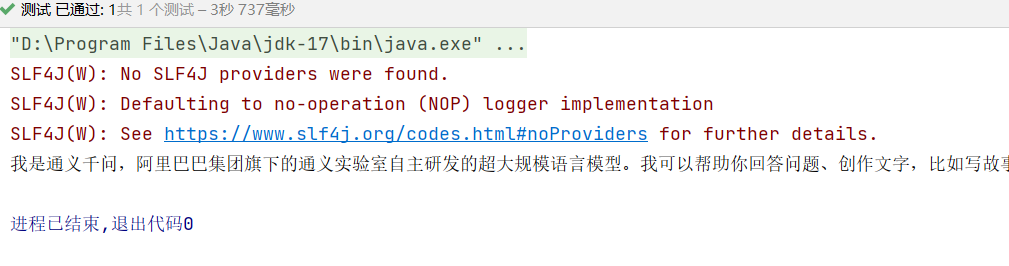
- */@Testvoidofficial(){OpenAiChatModel model =OpenAiChatModel.builder().baseUrl("http://langchain4j.dev/demo/openai/v1").apiKey("demo").modelName("gpt-4o-mini").build();String answer = model.chat("你是谁?");System.out.println(answer);}
使用通义千问(qwen-plus)
- /**
- * 接入通义千问(qwen-plus)
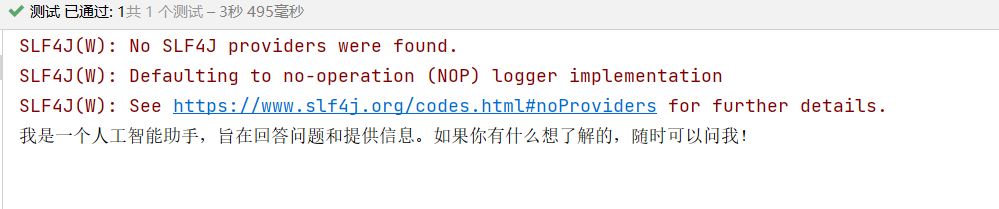
- */@TestvoidgetApiKey(){//获取环境变量配置的API-KEYString key =System.getenv("API-KEY");OpenAiChatModel model =OpenAiChatModel.builder().baseUrl("https://dashscope.aliyuncs.com/compatible-mode/v1")//基地址.apiKey(key)//密钥.modelName("qwen-plus")//使用模型.build();//构建//调用chat方法进行交互String mes = model.chat("你是谁?");System.out.println(mes);}
LangChain4j配置日志信息
日志依赖
- <dependency><groupId>ch.qos.logback</groupId><artifactId>logback-classic</artifactId><version>1.5.18</version></dependency>
设置logRequests和logResponses- OpenAiChatModel model =OpenAiChatModel.builder().baseUrl("https://dashscope.aliyuncs.com/compatible-mode/v1")//基地址.apiKey(key)//密钥.modelName("qwen-plus")//使用模型.logRequests(true)//请求.logResponses(true)//响应.build();//构建
Spring整合LangChain4j
使用环境
SpringBoot:3.2.4
引入依赖
- <dependency><groupId>dev.langchain4j</groupId><artifactId>langchain4j-open-ai-spring-boot-starter</artifactId><version>1.0.0-beta3</version></dependency>
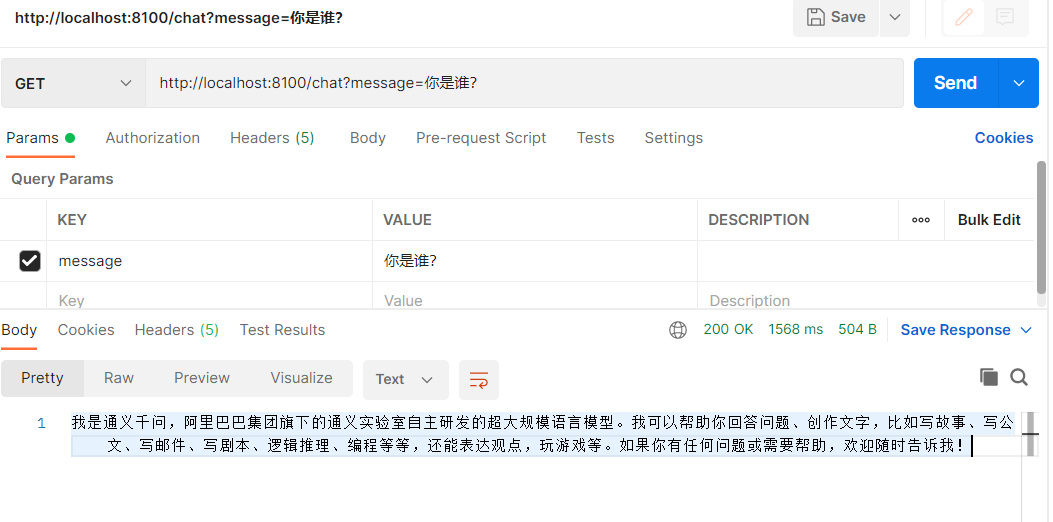
- server:port:8100#配置langchain4jlangchain4j:open-ai:chat-model:api-key: ${API-KEY}#使用环境变量配置base-url: https://dashscope.aliyuncs.com/compatible-mode/v1 #基地址model-name: qwen-plus #模型log-requests:true#请求log-responses:true#响应#配置日志级别 logging:level:dev.langchain4j: debug
Controller代码
- importdev.langchain4j.model.chat.ChatLanguageModel;importorg.springframework.beans.factory.annotation.Autowired;importorg.springframework.web.bind.annotation.GetMapping;importorg.springframework.web.bind.annotation.RequestParam;importorg.springframework.web.bind.annotation.RestController;@RestControllerpublicclassChatController{@AutowiredChatLanguageModel chatLanguageModel;@GetMapping("/chat")publicStringmodel(@RequestParam(value ="message", defaultValue ="Hello")String message){return chatLanguageModel.chat(message);}}
会话功能
AiService工具
引入依赖
- <!-- 工具 --><dependency><groupId>dev.langchain4j</groupId><artifactId>langchain4j-spring-boot-starter</artifactId><version>1.0.1-beta6</version></dependency>
- importdev.langchain4j.service.spring.AiService;importdev.langchain4j.service.spring.AiServiceWiringMode;@AiService(
- wiringMode =AiServiceWiringMode.EXPLICIT,//手动装配
- chatModel ="openAiChatModel"//指定模型)publicinterfaceConsultantService{publicStringchat(String mes);}
- importorg.example.service.ConsultantService;importorg.springframework.beans.factory.annotation.Autowired;importorg.springframework.web.bind.annotation.GetMapping;importorg.springframework.web.bind.annotation.RequestParam;importorg.springframework.web.bind.annotation.RestController;@RestControllerpublicclassChatController{@AutowiredprivateConsultantService consultantService;@GetMapping("chat")publicStringchat(@RequestParamString mes){String chat = consultantService.chat(mes);return chat;}}
引入依赖
- <!--流式调用--><dependency><groupId>org.springframework.boot</groupId><artifactId>spring-boot-starter-webflux</artifactId></dependency><dependency><groupId>dev.langchain4j</groupId><artifactId>langchain4j-reactor</artifactId><version>1.0.1-beta6</version></dependency>
- server:port:8100#配置langchain4jlangchain4j:open-ai:streaming-chat-model:#流式调用配置api-key: ${API-KEY}#使用环境变量配置base-url: https://dashscope.aliyuncs.com/compatible-mode/v1 #基地址model-name: qwen-plus #模型log-requests:true#请求log-responses:true#响应chat-model:#阻塞调用配置api-key: ${API-KEY}#使用环境变量配置base-url: https://dashscope.aliyuncs.com/compatible-mode/v1 #基地址model-name: qwen-plus #模型log-requests:true#请求log-responses:true#响应#配置日志级别 logging:level:dev.langchain4j: debug
修改接口
修改接口放回值,并且添加流式模型- importdev.langchain4j.service.spring.AiService;importdev.langchain4j.service.spring.AiServiceWiringMode;importreactor.core.publisher.Flux;@AiService(
- wiringMode =AiServiceWiringMode.EXPLICIT,//手动装配
- chatModel ="openAiChatModel",//阻塞 指定模型
- streamingChatModel ="openAiStreamingChatModel"//流式 指定模型)publicinterfaceConsultantService{publicFlux<String>chat(String mes);}
- importorg.example.service.ConsultantService;importorg.springframework.beans.factory.annotation.Autowired;importorg.springframework.web.bind.annotation.GetMapping;importorg.springframework.web.bind.annotation.RequestParam;importorg.springframework.web.bind.annotation.RestController;importreactor.core.publisher.Flux;@RestControllerpublicclassChatController{@AutowiredprivateConsultantService consultantService;// @GetMapping(value = "chat",produces = "text/html;charset=utf-8") //produces设置字符集@GetMapping(value ="chat")publicFlux<String>chat(@RequestParamString mes){Flux<String> chat = consultantService.chat(mes);return chat;}}
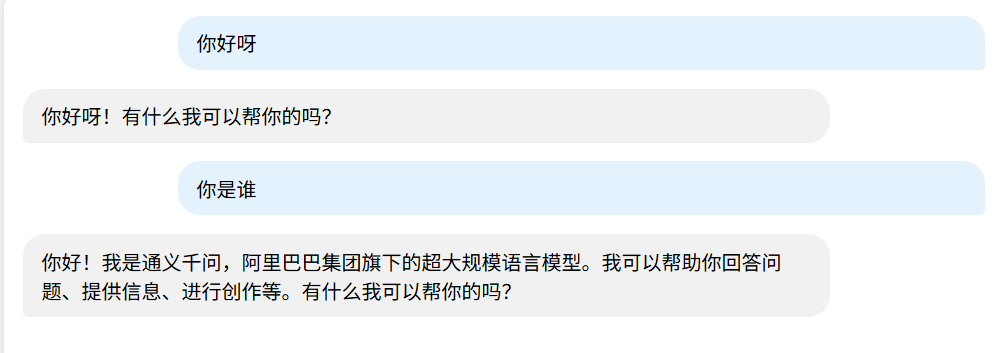
还在输出中
输出完成
消息注解
@SystemMessage
用于标记系统消息,通常用于设置AI助手的角色或行为
使用
添加@SystemMessage注解,并且设置系统提示词,
定义 AI 助手的 角色(如“你是一名心理咨询师”)。提供 行为规范(如“回答要简洁专业”)。设置 全局上下文(如“所有回答请用中文”)。
- importdev.langchain4j.service.SystemMessage;importdev.langchain4j.service.spring.AiService;importdev.langchain4j.service.spring.AiServiceWiringMode;importreactor.core.publisher.Flux;@AiService(
- wiringMode =AiServiceWiringMode.EXPLICIT,//手动装配
- chatModel ="openAiChatModel",//阻塞 指定模型
- streamingChatModel ="openAiStreamingChatModel"//流式 指定模型)publicinterfaceConsultantService{@SystemMessage("你是一名心理咨询师")publicFlux<String>chat(String mes);}
@UserMessage
用于定义 用户输入 或 AI 需要处理的查询。它通常与 @SystemMessage 结合使用,构建完整的 AI 对话逻辑。
使用
1.定义用户的输入(如问题、指令)。
2.支持模板化输入(使用 {{variable}} 语法动态插入变量)。- @UserMessage("1.友好且专业的语气回答2.简短回答,{{it}}")//协助用户设置词条,it为默认参数表示用户消息publicFlux<String>chat(String mes);
引入外部文本系统提示词
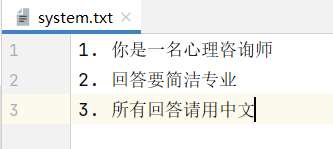
在resource目录下创建system.txt文件
使用system.txt文件- @SystemMessage(fromResource ="system.txt")//提供文本设置publicFlux<String>chat(String mes);
如果不使用@V注解的话,默认就是{{it}}- @UserMessage("1.友好且专业的语气回答2.简短回答,{{mes}}")//协助用户设置词条publicFlux<String>chat(@V("mes")String mes);
在 LangChain4j 中,会话记忆(Conversation Memory)是指 AI 能够记住之前的对话内容,从而实现多轮对话的上下文感知能力。
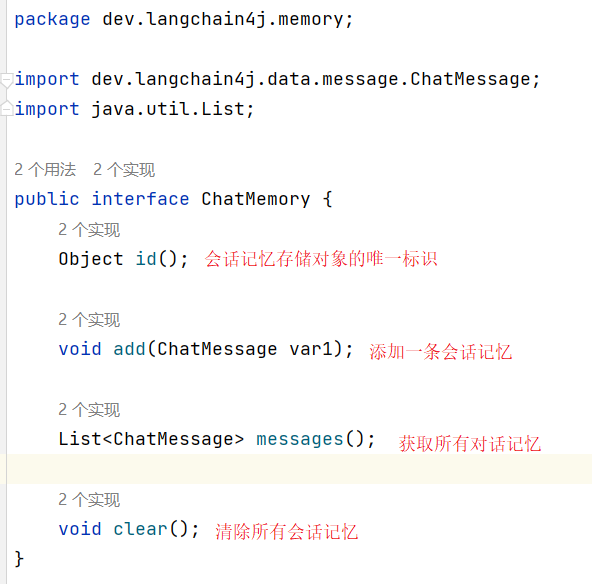
ChatMemory接口介绍
配置会话记忆对象提供者
- @ConfigurationpublicclassComponentConfig{@BeanpublicChatMemorychatMemory(){returnMessageWindowChatMemory.builder().maxMessages(5)// 保留最近5条消息.build();//构建}}
- @AiService(
- wiringMode =AiServiceWiringMode.EXPLICIT,//手动装配
- chatModel ="openAiChatModel",//阻塞 指定模型
- streamingChatModel ="openAiStreamingChatModel",//流式 指定模型
- chatMemory ="chatMemory"//指定消息记忆)
如果不实现会话隔离,所有人使用的会话记忆是共用的
核心隔离机制
@MemoryId 会话隔离,最基础的隔离方式,为每个对话会话分配唯一ID
配置会话记忆对象提供者
- @BeanpublicChatMemoryProviderchatMemoryProvider(){returnnewChatMemoryProvider(){@OverridepublicChatMemoryget(Object o){//这个o就是消息ID唯一标识returnMessageWindowChatMemory.builder().id(o)//唯一标识.maxMessages(5).build();}};}
@AiService添加参数- @AiService(
- wiringMode =AiServiceWiringMode.EXPLICIT,//手动装配
- chatModel ="openAiChatModel",//阻塞 指定模型
- streamingChatModel ="openAiStreamingChatModel",//流式 指定模型
- chatMemoryProvider ="chatMemoryProvider")
- @SystemMessage(fromResource ="system.txt")//提供文本设置publicFlux<String>chat(@MemoryIdString memoryId,@UserMessageString mes);
- @RestControllerpublicclassChatController{@AutowiredprivateConsultantService consultantService;@GetMapping(value ="chat",produces ="text/html;charset=utf-8")//produces设置字符集publicFlux<String>chat(@RequestParamString memoryId,@RequestParamString mes){Flux<String> chat = consultantService.chat(memoryId,mes);return chat;}}
如果我们重启了服务器,之前和用户会话记忆全部都会消失,因为会话记忆全部都在服务器内存当中,没有保存,可以将数据存储在mysql中或其它地方
使用了mybatis-plus
配置mysql
sql表,存储会话历史消息- CREATETABLE`messages`(`id`intNOTNULLAUTO_INCREMENT,`memory_id`varchar(128)CHARACTERSET utf8mb4 COLLATE utf8mb4_0900_ai_ci NOTNULL,`json_text`textCHARACTERSET utf8mb4 COLLATE utf8mb4_0900_ai_ci NOTNULL,PRIMARYKEY(`id`)USINGBTREE)ENGINE=InnoDBAUTO_INCREMENT=2076209155CHARACTERSET= utf8mb4 COLLATE= utf8mb4_0900_ai_ci ROW_FORMAT = Dynamic;
- spring:datasource:type: com.mysql.cj.jdbc.MysqlDataSource
- driver-class-name: com.mysql.cj.jdbc.Driver
- url: jdbc:mysql://localhost:3306/ai_demo
- username: root
- password:123
- importcom.baomidou.mybatisplus.core.conditions.query.QueryWrapper;importdev.langchain4j.data.message.ChatMessage;importdev.langchain4j.data.message.ChatMessageDeserializer;importdev.langchain4j.data.message.ChatMessageSerializer;importdev.langchain4j.store.memory.chat.ChatMemoryStore;importorg.example.pojo.Messages;importorg.example.service.MessagesService;importorg.springframework.beans.factory.annotation.Autowired;importorg.springframework.stereotype.Repository;importjava.util.List;@RepositorypublicclassMysqlChatMemoryStoreimplementsChatMemoryStore{@AutowiredMessagesService messagesService;/**
- * @param o 为 memoryId
- * @return
- */@OverridepublicList<ChatMessage>getMessages(Object o){//获取QueryWrapper qw =newQueryWrapper<>();
- qw.eq("memory_id",o);Messages one = messagesService.getOne(qw);List<ChatMessage> chatMessages =List.of();if(one !=null)
- chatMessages =ChatMessageDeserializer.messagesFromJson(one.getJsonText());return chatMessages;}@OverridepublicvoidupdateMessages(Object o,List<ChatMessage> list){//更新会话消息//把list数据转换为json数据String s =ChatMessageSerializer.messagesToJson(list);//把json数据存储到mysql中Messages messages =newMessages();
- messages.setMemoryId(o.toString());
- messages.setJsonText(s);QueryWrapper qw =newQueryWrapper<>();
- qw.eq("memory_id",o);
- messagesService.saveOrUpdate(messages,qw);}@OverridepublicvoiddeleteMessages(Object o){QueryWrapper qw =newQueryWrapper<>();
- qw.eq("memory_id",o);
-
- messagesService.remove(qw);}}
- @ConfigurationpublicclassComponentConfig{@AutowiredMysqlChatMemoryStore mysqlChatMemoryStore;@BeanpublicChatMemoryProviderchatMemoryProvider(){returnnewChatMemoryProvider(){@OverridepublicChatMemoryget(Object o){//这个o就是消息ID唯一标识returnMessageWindowChatMemory.builder().id(o)//唯一标识.maxMessages(5).chatMemoryStore(mysqlChatMemoryStore)//配置提供ChatMemoryStore接口.build();}};}}
RAG(Retrieval-Augmented Generation)是一种结合信息检索与文本生成的技术架构,广泛应用于问答系统、对话机器人和知识密集型任务中。下面我将全面介绍RAG知识库的核心概念、技术实现和最佳实践。
快速入门
引入依赖
- <!-- RAG--><dependency><groupId>dev.langchain4j</groupId><artifactId>langchain4j-easy-rag</artifactId><version>1.0.1-beta6</version></dependency>
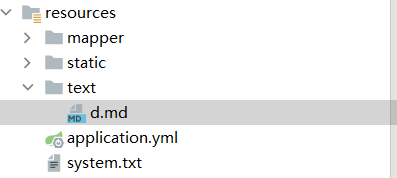
创建md类型文件,其它的文件也行
里面是一些近几年的高考数据
构建向量数据库操作对象
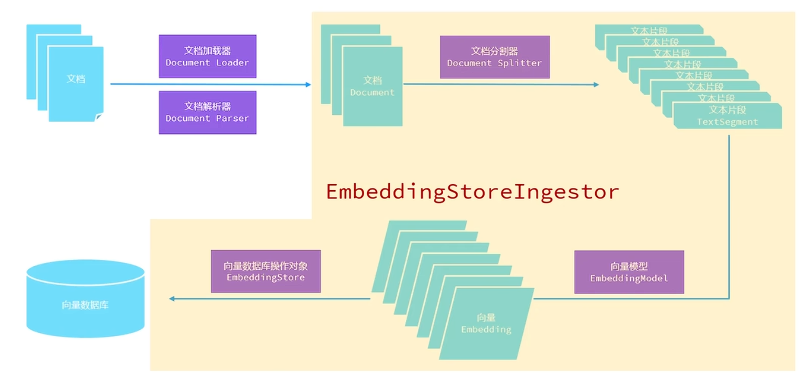
- //构建向量数据库操作对象@BeanpublicEmbeddingStorestore(){//加载文档中的内容进入内存List<Document> text =ClassPathDocumentLoader.loadDocuments("text");//构建向量数据库操作对象InMemoryEmbeddingStore store =newInMemoryEmbeddingStore();//构建一个EmbeddingStoreIngestor对象 完成数据切割、向量化、存储EmbeddingStoreIngestor build =EmbeddingStoreIngestor.builder().embeddingStore(store).build();
- build.ingest(text);return store;}
- //构建向量数据库检索对象@BeanpublicContentRetrievercontentRetriever(EmbeddingStore store){returnEmbeddingStoreContentRetriever.builder().embeddingStore(store).maxResults(3)//最大数据.minScore(0.6)//相似度.build();}
- @AiService(
- wiringMode =AiServiceWiringMode.EXPLICIT,//手动装配
- chatModel ="openAiChatModel",//阻塞 指定模型
- streamingChatModel ="openAiStreamingChatModel",//流式 指定模型
- chatMemoryProvider ="chatMemoryProvider",
- contentRetriever ="contentRetriever"//配置向量数据库检索对象)
文档加载器
1. 文件系统加载器
FileSystemDocumentLoader - 加载本地系统中的文档- List<Document> text =FileSystemDocumentLoader.loadDocuments("C:\\Users\\Xiri\\Desktop\\Learn_LangChain4j\\LangChain-RAG\\src\\main\\resources\\text");
指定类路径下的文件路径(相对 resources 目录的路径)- List<Document> text =ClassPathDocumentLoader.loadDocuments("text");
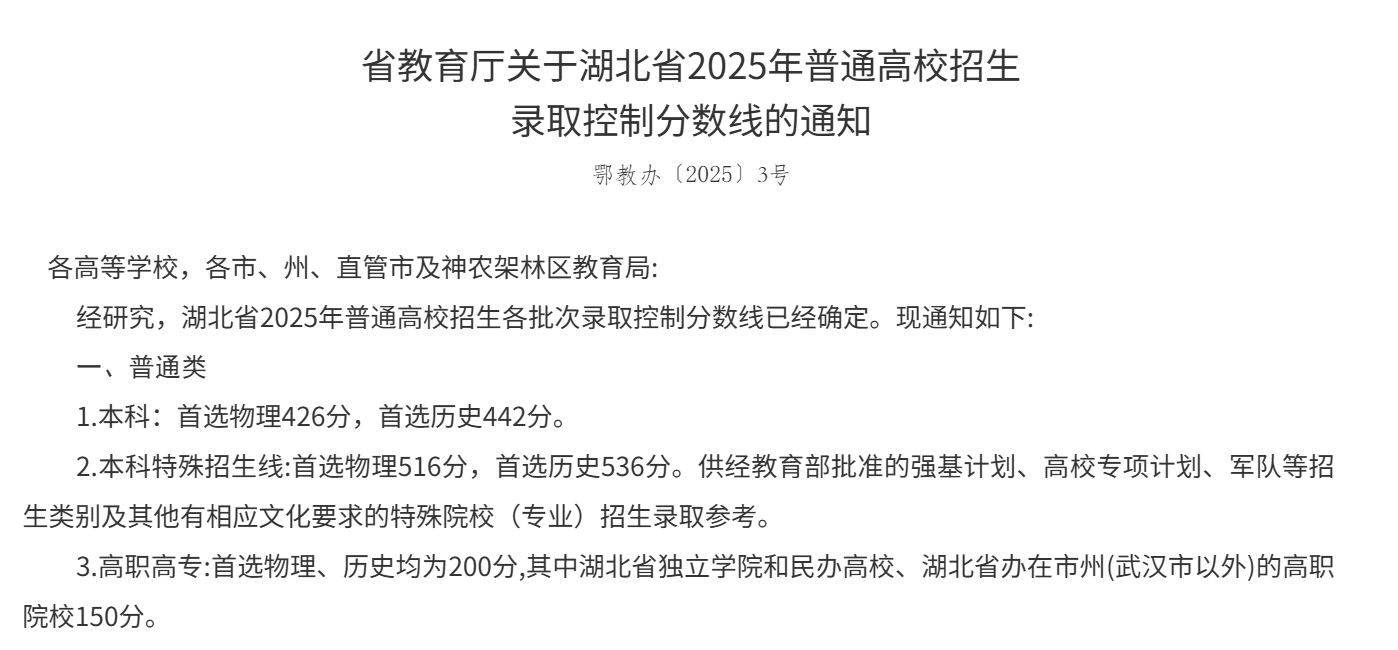
- //网络链接加载//湖北省2025年普通高校招生录取控制分数线 网址Document text =UrlDocumentLoader.load("https://jyt.hubei.gov.cn/zfxxgk/zc_GK2020/qtzdgkwj_GK2020/202506/t20250626_5706550.shtml",newApacheTikaDocumentParser());
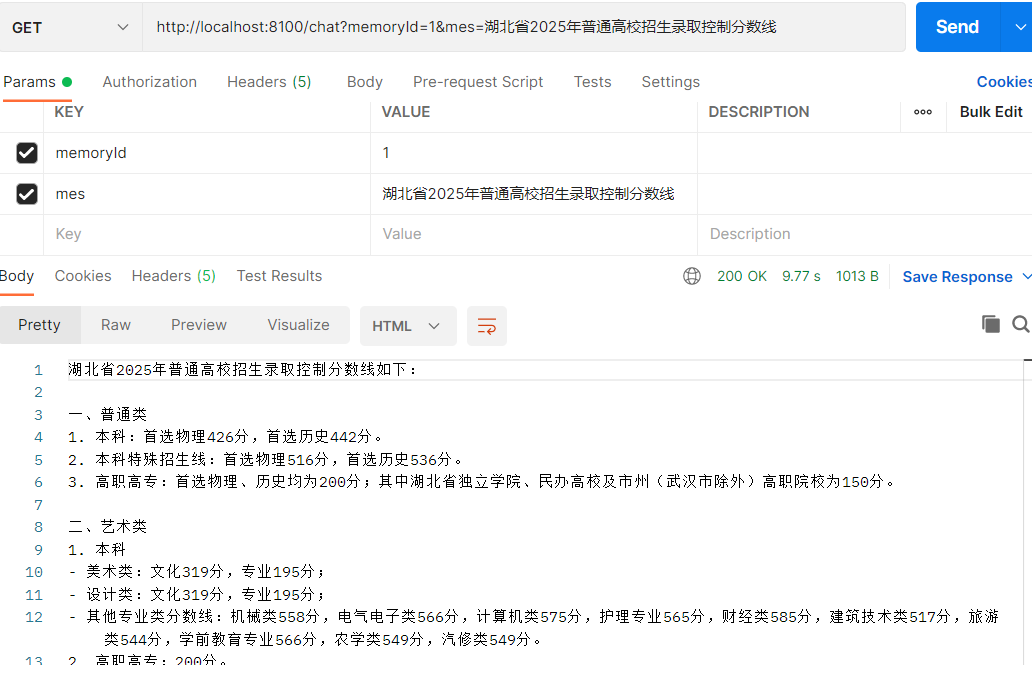
询问:湖北省2025年普通高校招生录取控制分数线
和官网对比
文档解析器
1.默认解析器
ApacheTikaDocumentParser可以解析大部分文件- newApacheTikaDocumentParser()
3.PDF文件解析器
引入依赖- <!--pdf解析器--><dependency><groupId>dev.langchain4j</groupId><artifactId>langchain4j-document-parser-apache-pdfbox</artifactId><version>1.0.1-beta6</version></dependency>
- Document text =FileSystemDocumentLoader.loadDocument("C:\\Users\\Xiri\\Desktop\\Learn_LangChain4j\\LangChain-RAG\\src\\main\\resources\\text\\2025hbgk.pdf",newApachePdfBoxDocumentParser());
- <!--处理办公文档等解析器--><dependency><groupId>dev.langchain4j</groupId><artifactId>langchain4j-document-parser-apache-poi</artifactId><version>1.0.1-beta6</version></dependency>
- newApachePoiDocumentParser()
使用ApachePdfBoxDocumentParser解析器- //构建向量数据库操作对象@BeanpublicEmbeddingStorestore()//名字配置为store,如果配置名为embeddingStore会重名,有一个默认的{//使用解析器Document text =FileSystemDocumentLoader.loadDocument("C:\\Users\\Xiri\\Desktop\\Learn_LangChain4j\\LangChain-RAG\\src\\main\\resources\\text\\2025hbgk.pdf",newApachePdfBoxDocumentParser());//构建向量数据库操作对象InMemoryEmbeddingStore store =newInMemoryEmbeddingStore();//构建一个EmbeddingStoreIngestor对象 完成数据切割、向量化、存储EmbeddingStoreIngestor build =EmbeddingStoreIngestor.builder().embeddingStore(store).build();
- build.ingest(text);//设置文本return store;}
文档分割器
默认使用DocumentSplitters.recursive()
DocumentSplitters.recursive() 是 LangChain4j 提供的递归文档分割器的核心 API,用于将长文档智能拆分为语义连贯的文本片段
构建文本分割器对象
- //构建文档分割器对象DocumentSplitter recursive =DocumentSplitters.recursive(500,//每个片段最大能容纳的字符100//两个片段之间重叠字符个数);
- @BeanpublicEmbeddingStorestore()//名字配置为store,如果配置名为embeddingStore会重名,有一个默认的{Document text =FileSystemDocumentLoader.loadDocument("C:\\Users\\Xiri\\Desktop\\Learn_LangChain4j\\LangChain-RAG\\src\\main\\resources\\text\\2025hbgk.pdf",newApachePdfBoxDocumentParser());//构建文档分割器对象DocumentSplitter recursive =DocumentSplitters.recursive(500,//每个片段最大能容纳的字符100//两个片段之间重叠字符个数);//构建向量数据库操作对象InMemoryEmbeddingStore store =newInMemoryEmbeddingStore();//构建一个EmbeddingStoreIngestor对象 完成数据切割、向量化、存储EmbeddingStoreIngestor build =EmbeddingStoreIngestor.builder().embeddingStore(store).documentSplitter(recursive)//设置文档分割器.build();
- build.ingest(text);//设置文本return store;}
向量模型
向量模型将数据(如单词、句子、文档)映射到高维向量空间,每个维度代表数据的某种特征(如词频、语义等)。相似的数据在向量空间中距离较近,反之则较远
例如:
“猫”的向量可能是 [0.8, 0.2, 0.6],而“狗”的向量是 [0.7, 0.3, 0.5],两者余弦相似度高;
“桌子”的向量可能是 [0.1, 0.9, 0.0],与“猫”差异显著。
余弦相似度:
最常用的相似度计算方法,通过向量夹角余弦值衡量相关性(范围:0~1)
配置向量模型
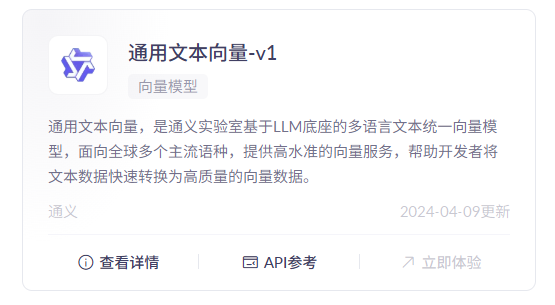
找一个文本向量模型使用,并且配置
- #配置langchain4jlangchain4j:open-ai:embedding-model:#向量模型api-key: ${API-KEY}#使用环境变量配置base-url: https://dashscope.aliyuncs.com/compatible-mode/v1 #基地址model-name: text-embedding-v1 #文本向量模型log-requests:true#请求log-responses:true#响应
- @AutowiredEmbeddingModel embeddingModel;
- //构建向量数据库操作对象@BeanpublicEmbeddingStorestore()//名字配置为store,如果配置名为embeddingStore会重名,有一个默认的{Document text =FileSystemDocumentLoader.loadDocument("C:\\Users\\Xiri\\Desktop\\Learn_LangChain4j\\LangChain-RAG\\src\\main\\resources\\text\\2025hbgk.pdf",newApachePdfBoxDocumentParser());//构建文档分割器对象DocumentSplitter recursive =DocumentSplitters.recursive(500,//每个片段最大能容纳的字符100//两个片段之间重叠字符个数);//构建向量数据库操作对象InMemoryEmbeddingStore store =newInMemoryEmbeddingStore();//构建一个EmbeddingStoreIngestor对象 完成数据切割、向量化、存储EmbeddingStoreIngestor build =EmbeddingStoreIngestor.builder().embeddingStore(store).documentSplitter(recursive)//设置文档分割器.embeddingModel(embeddingModel)//设置向量模型.build();
- build.ingest(text);//文本return store;}//构建向量数据库检索对象@BeanpublicContentRetrievercontentRetriever(EmbeddingStore store){returnEmbeddingStoreContentRetriever.builder().embeddingStore(store).maxResults(3)//最大数据.minScore(0.6)//相似度.embeddingModel(embeddingModel)//设置向量模型.build();}
设置EmbeddingStoreIngestor和EmbeddingStoreContentRetriever的embeddingModel方法
运行
看到向量数据就代表成功了
向量数据库
之前向量数据库都是放在内存上了,服务器关机就没有了,使用Chroma持久化
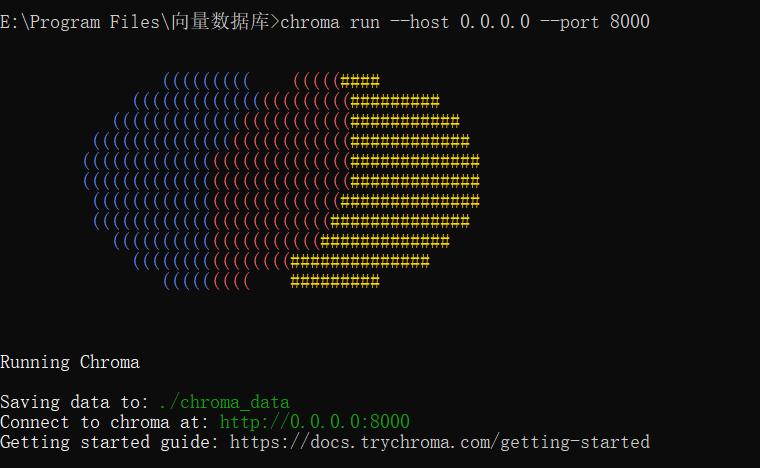
运行Chroma
使用Chroma:0.4.20
运行Chroma
引入依赖
- <!-- 向量数据库--><dependency><groupId>dev.langchain4j</groupId><artifactId>langchain4j-chroma</artifactId><version>1.0.1-beta6</version></dependency>
- //构建Chroma向量数据库@BeanpublicChromaEmbeddingStorechromaEmbeddingStore(){returnChromaEmbeddingStore.builder().baseUrl("http://localhost:8000")// Chroma 服务地址.collectionName("my-collection")// 向量集合名称.logRequests(true)//请求日志.logResponses(true)//响应日志.build();}
- //构建一个EmbeddingStoreIngestor对象 完成数据切割、向量化、存储EmbeddingStoreIngestor build =EmbeddingStoreIngestor.builder().embeddingStore(chromaEmbeddingStore()).documentSplitter(recursive)//设置文档分割器.embeddingModel(embeddingModel)//设置向量模型.build();
- build.ingest(text);
- returnEmbeddingStoreContentRetriever.builder().embeddingStore(chromaEmbeddingStore()).maxResults(3)//最大数据.minScore(0.6)//相似度.embeddingModel(embeddingModel)//设置向量模型.build();
结果
补充:只有第一次加载的时候需要完成数据切割、向量化、存储,之后不需要,可以将store方法的bean注释掉
Tools工具
创建工具方法
- importdev.langchain4j.agent.tool.P;importdev.langchain4j.agent.tool.Tool;importorg.springframework.stereotype.Component;@ComponentpublicclassAiTool{@Tool("预约高考志愿填报信息服务")publicvoidaddData(@P("姓名")String name,@P("性别")String sex,@P("手机号")String phone
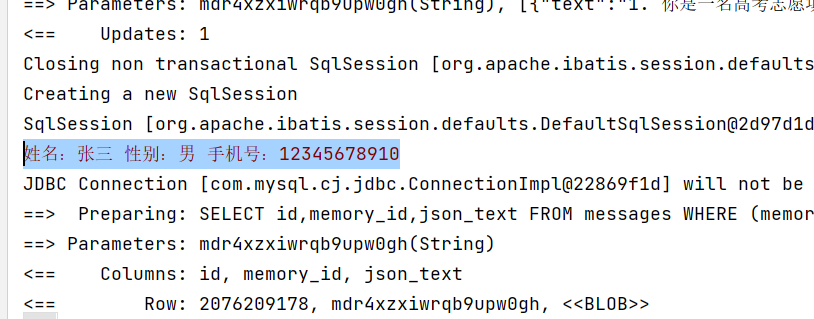
- ){System.err.println("姓名:"+name+" 性别:"+sex+" 手机号:"+phone);}@Tool("取消预约高考志愿填报")publicvoidcancel(){System.err.println("已取消预约");}}
- @AiService(
- wiringMode =AiServiceWiringMode.EXPLICIT,//手动装配
- chatModel ="openAiChatModel",//阻塞 指定模型
- streamingChatModel ="openAiStreamingChatModel",//流式 指定模型
- chatMemoryProvider ="chatMemoryProvider",
- contentRetriever ="contentRetriever"//配置向量数据库检索对象,
- tools ="aiTool"//配置AI工具类,使用名字注入)
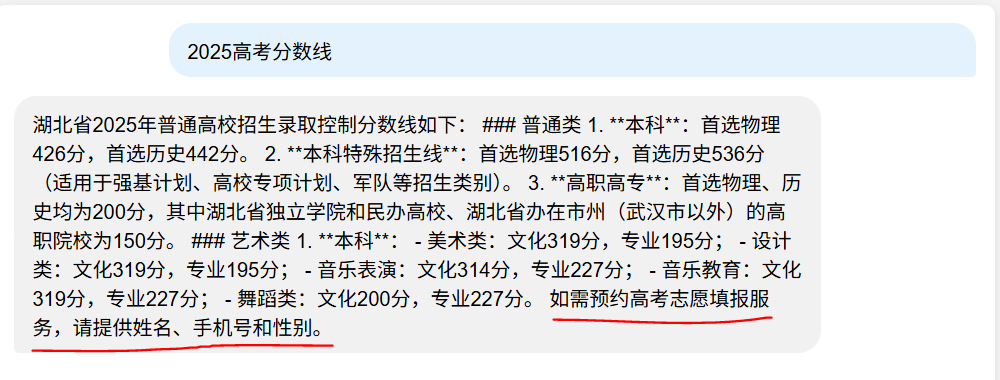
效果
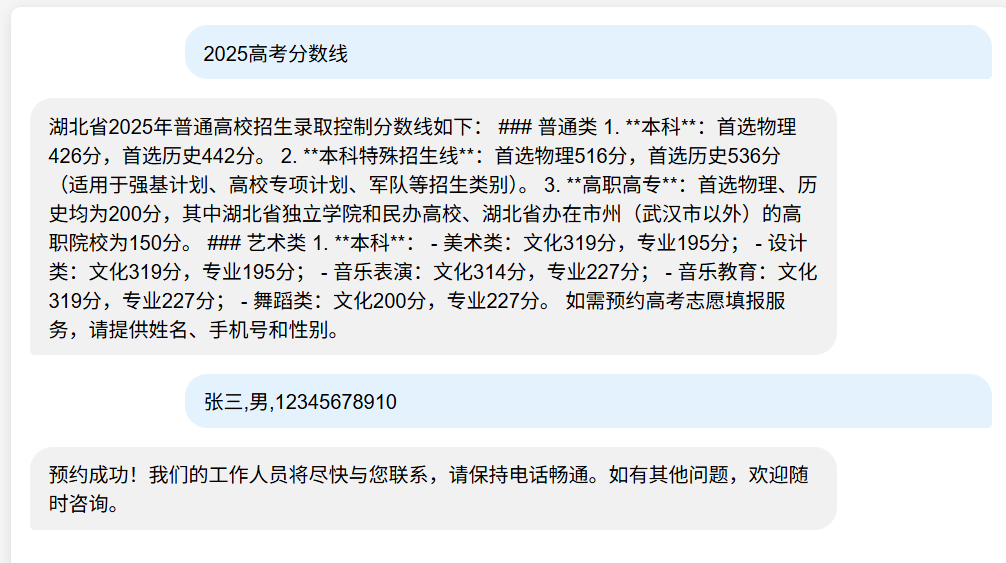
查看2025年高考分数线
给他提供用户信息帮忙预约
预约成功后发现ai调用了addData方法
原文地址:https://blog.csdn.net/qq_64851111/article/details/149699076 |


















 广告
广告