开启左侧

langchain—chatchat

[复制链接]
dengfangmian 发表于 10 小时前 | 显示全部楼层 |阅读模式 打印 上一主题 下一主题
作者:CSDN博客
署部


  • 下载项目
    1. git clone --recursive https://github.com/chatchat-space/Langchain-Chatchat.git
    复制代码
  • 进入目录
    1. cd Langchain-Chatchat
    复制代码
  • anaconda环境准备

    • 创建python环境       
      1. conda create -n langchain_env python=3.10 -y
      复制代码
    • 激活环境       
      1. conda activate langchain_env
      复制代码
    • 验证pyhton环境       
      1. python --version
      复制代码

  • 安装依赖
    1. pip install langchain-chatchat  -i   https://pypi.tuna.tsinghua.edu.cn/simple
    复制代码
    改变初始化生成的文件目录
    1. export CHATCHAT_ROOT=自定义目录
    复制代码
    初始化
    1. chatchat init
    复制代码
  • 验证
    1. #API文档
    2. http://localhost:7861/docs
    3. #langchat-chatcat url
    4. http://localhost:8501/
    复制代码
  • 获取langchain-chatchat下载
    1. curl https://github.com/chatchat-space/Langchain-Chatchat
    复制代码
    1. https://gitee.com/www.ydj.com/Langchain-Chatchat
    复制代码

配置

.py版本

ollama模型配置
  1. vim /langchain-chatchat/configs/model_config.py
复制代码
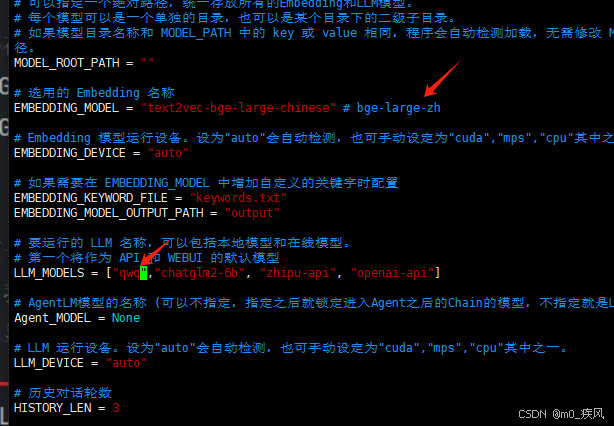
    配置大语言模型和嵌入模型名
    langchain—chatchat-1.png

  • 配置ollama服务
    1. ONLINE_LLM_MODEL = {
    2. # 加入Ollama
    3. "ollama":{
    4.         "model_name":"qwq",
    5.         "api_base_url":"http://58.144.197.135:15003/",
    6.     }
    7. }
    复制代码
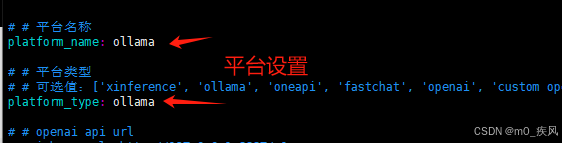
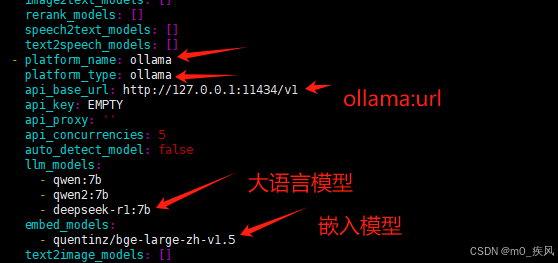
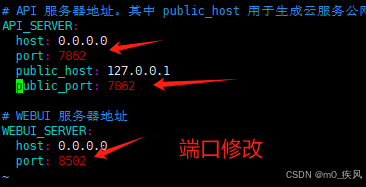
.yaml

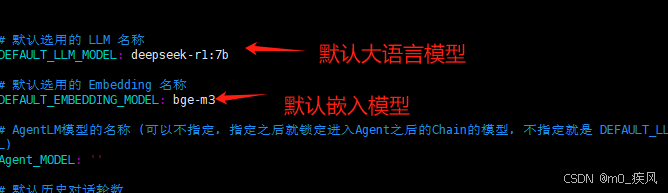
ollama模型配置

    默认用户目录下修改 model_setting.yaml
    langchain—chatchat-2.png

    langchain—chatchat-3.png

    langchain—chatchat-4.png

    可选
    langchain—chatchat-5.png

  • 运行
    1. chatchat kb -r
    复制代码
  • 启动
    1. chatchat  start -a
    复制代码
报错

RAG


  • 更换httpx版本
    1. // 卸载旧版本 0.28.1
    2. pip uninstall httpx
    3. // 安装新版本 0.27.2
    4. pip install httpx==0.27.2
    复制代码
  • 重启
    1. // 重新启动
    2. chatchat start -a
    复制代码

原文地址:https://blog.csdn.net/m0_70834380/article/details/147815405
回复

使用道具 举报

您需要登录后才可以回帖 登录 | 立即注册

本版积分规则

发布主题
阅读排行更多+

Powered by Discuz! X3.4© 2001-2013 Discuz Team.( 京ICP备17022993号-3 )