作者:CSDN博客
目录
1. 引言2. 添加Human Assistance工具3. 编译状态图4. 提示聊天机器人5. 恢复执行参考
1. 引言
智能体可能不可靠,甚至需要人工输入才能完成任务。同样,对于某些操作,你可能需要在运行前获得人工批准,以保证一切按预期运行。
LangGraph的持久层支持人机交互工作流,允许根据用户反馈暂停和恢复执行。此功能的主要接口是interrupt函数。在节点内部调用Interrupt将暂停执行。可以通过传入command来interrupt执行,并接收新的人工输入。interrupt在人机工程学上类似于Python的内置input(),但也有一些注意事项。
2. 添加Human Assistance工具
初始化聊天模型:- from langchain.chat_models import init_chat_model
- llm = init_chat_model("deepseek:deepseek-chat")
- from typing import Annotated
- from langchain_tavily import TavilySearch
- from langchain_core.tools import tool
- from typing_extensions import TypedDict
- from langgraph.checkpoint.memory import MemorySaver
- from langgraph.graph import StateGraph, START, END
- from langgraph.graph.message import add_messages
- from langgraph.prebuilt import ToolNode, tools_condition
- from langgraph.types import Command, interrupt
- classState(TypedDict):
- messages: Annotated[list, add_messages]
- graph_builder = StateGraph(State)@tooldefhuman_assistance(query:str)->str:"""Request assistance from a human."""
- human_response = interrupt({"query": query})return human_response["data"]
- tool = TavilySearch(max_results=2)
- tools =[tool, human_assistance]
- llm_with_tools = llm.bind_tools(tools)defchatbot(state: State):
- message = llm_with_tools.invoke(state["messages"])# Because we will be interrupting during tool execution,# we disable parallel tool calling to avoid repeating any# tool invocations when we resume.assertlen(message.tool_calls)<=1return{"messages":[message]}
- graph_builder.add_node("chatbot", chatbot)
- tool_node = ToolNode(tools=tools)
- graph_builder.add_node("tools", tool_node)
- graph_builder.add_conditional_edges("chatbot",
- tools_condition,)
- graph_builder.add_edge("tools","chatbot")
- graph_builder.add_edge(START,"chatbot")
使用检查点编译状态图:- memory = MemorySaver()
- graph = graph_builder.compile(checkpointer=memory)
向聊天机器人提出一个问题,该问题将使用human assistance工具:- user_input ="I need some expert guidance for building an AI agent. Could you request assistance for me?"
- config ={"configurable":{"thread_id":"1"}}
- events = graph.stream({"messages":[{"role":"user","content": user_input}]},
- config,
- stream_mode="values",)for event in events:if"messages"in event:
- event["messages"][-1].pretty_print()
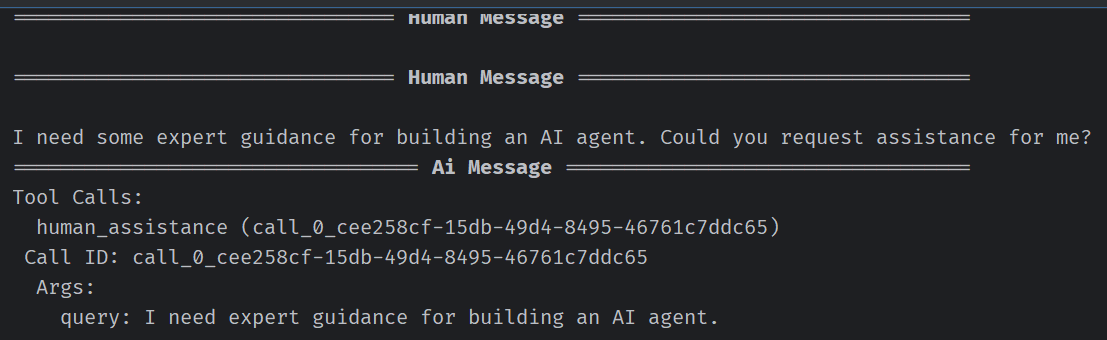
聊天机器人生成了一个工具调用,但随后执行被中断。如果你检查状态图,会发现它在工具节点处停止了:- snapshot = graph.get_state(config)
- snapshot.next
要恢复执行需要传递一个包含工具所需数据的Command对象。此数据的格式可根据需要自定义。在本例中,使用一个带有键”data"字典:- human_response =("We, the experts are here to help! We'd recommend you check out LangGraph to build your agent."" It's much more reliable and extensible than simple autonomous agents.")
- human_command = Command(resume={"data": human_response})
- events = graph.stream(human_command, config, stream_mode="values")for event in events:if"messages"in event:
- event["messages"][-1].pretty_print()
- ================================== Ai Message ==================================
- Tool Calls:
- human_assistance (call_0_cee258cf-15db-49d4-8495-46761c7ddc65)
- Call ID: call_0_cee258cf-15db-49d4-8495-46761c7ddc65
- Args:
- query: I need expert guidance for building an AI agent.================================= Tool Message =================================
- Name: human_assistance
- We, the experts are here to help! We'd recommend you check out LangGraph to build your agent. It's much more reliable and extensible than simple autonomous agents.================================== Ai Message ==================================
- Great! It seems the experts recommend using **LangGraph**for building your AI agent,as it is more reliable and extensible compared to simple autonomous agents.
- If you'd like, I can provide more details about LangGraph or assist you with specific steps to get started. Let me know how you'd like to proceed!
https://langchain-ai.github.io/langgraph/tutorials/get-started/4-human-in-the-loop/
原文地址:https://blog.csdn.net/qq_51180928/article/details/148014677 |











 广告
广告